Why Dual Memory Card Slots Are Essential for Professional Photography
There are certain pieces of photographic equipment that receive a tremendous amount of attention. Cameras, lenses, tripods, filters, lighting systems, and accessories are constantly being discussed, reviewed, and compared. Photographers spend considerable time researching the latest technology, looking for better image quality, improved autofocus, greater dynamic range, and more advanced features.
But there's one important part of your camera system that doesn't always receive the attention it deserves: your memory cards.
More specifically, how you use them.
If your camera has two memory card slots, are you actually using both of them? And if you are, have you configured your camera to create a backup of every photograph you take?
This might seem like a relatively minor detail, but I consider it one of the most important features of a camera intended for professional photography.
After more than 25 years working in photography, I've learned that creating a great photograph is only part of the job. Protecting that photograph is equally important, particularly when you're working for a client who is depending on you to deliver images that cannot be recreated.
The Photograph You Can't Take Again
Let's start with a situation that every professional photographer should consider.
Imagine photographing an entire wedding. You've spent the day capturing the bride and groom getting ready, the ceremony, family portraits, the first kiss, the reception, and all those spontaneous moments that make a wedding memorable.
You return home, insert your memory card into your computer, and discover that the card is unreadable.
Perhaps the card's controller has failed. Maybe the file system has become corrupted. Perhaps something happened during the recording process.
Whatever the reason, you suddenly find yourself facing the possibility of losing an entire day's work.
You might be able to recover some of the files using specialized recovery software, but there is no guarantee. Sometimes a memory card failure can result in the permanent loss of photographs.
And here's the problem: you cannot go back and photograph the wedding again.
You can't ask the bride and groom to repeat their ceremony. You can't recreate the first kiss or bring everyone back together for those family photographs.
Those moments happened once.
Your client trusted you to preserve them, and you have a professional responsibility to protect the images you were hired to create.
This is exactly why I believe dual memory card slots are so important.
What Dual Memory Card Slots Actually Do
Many modern cameras offer two memory card slots, but simply having two cards installed doesn't automatically mean you're protected.
The camera must be configured to record your photographs to both cards simultaneously.
Most cameras offer several recording configurations. Depending on the manufacturer and model, you may have the option to record to one card until it's full and then switch to the second card, record RAW files to one card and JPEG files to the other, or record identical files to both cards at the same time.
These options serve different purposes.
For professional backup, I recommend simultaneous recording.
When you press the shutter, your camera writes the photograph to the primary memory card and creates a second copy on the other card.
You now have two copies of the same photograph stored on two separate physical cards.
If one card develops a problem, you have another copy available.
That's the entire purpose of redundancy.
You're not improving the image quality, changing the exposure, or making your camera perform better. You're protecting the work you've already created.
On my Nikon Z8, I can configure the two card slots for simultaneous recording. It's a feature I appreciate because it provides an additional level of protection whenever I'm working on an assignment where losing the photographs would be particularly consequential.
The important thing is to understand how your particular camera handles dual-card recording. Manufacturers use slightly different terminology, so take the time to read your camera manual and verify the settings.
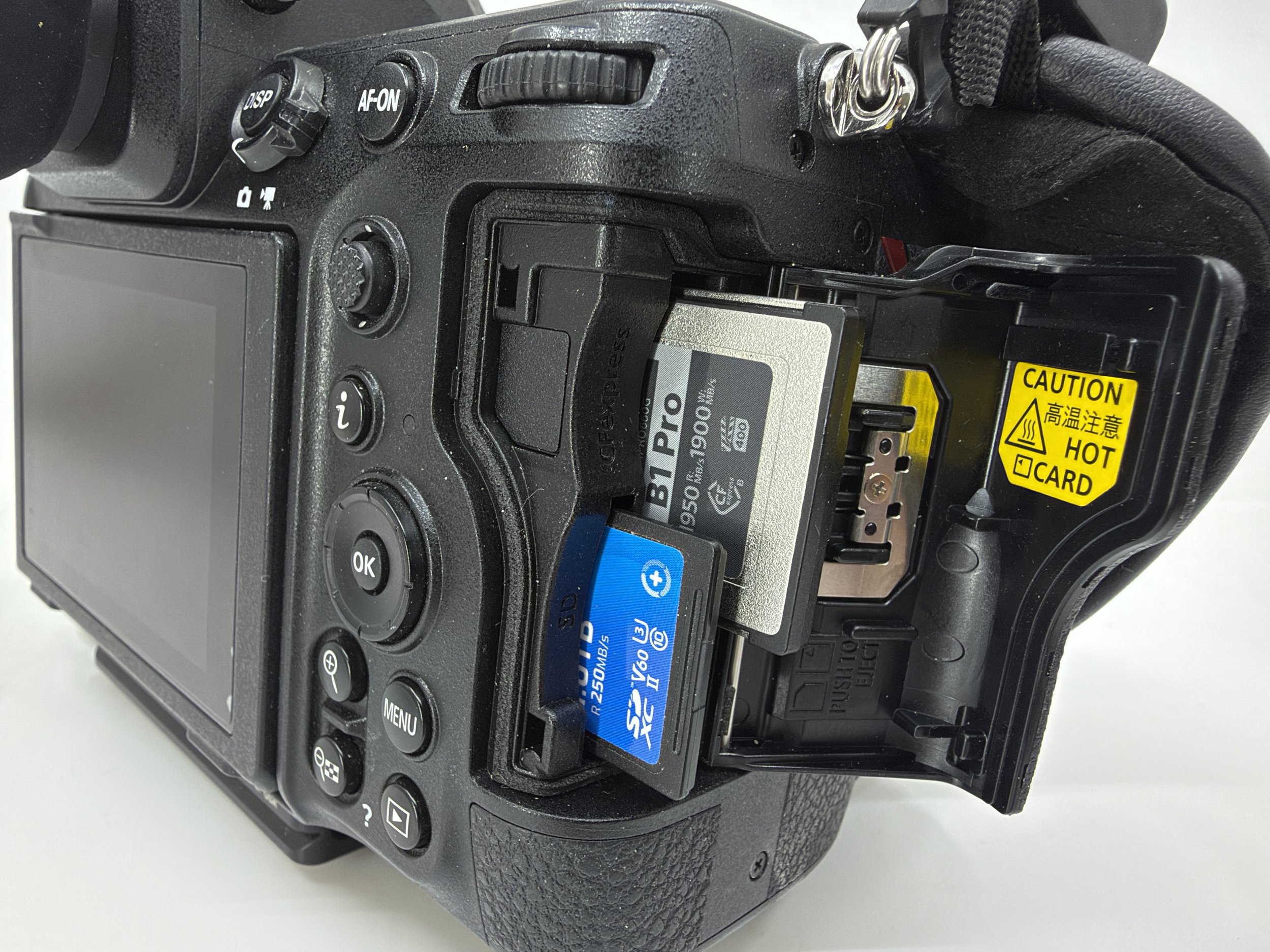
Backup Recording Versus Overflow Recording
This is where I think many photographers make a mistake.
They purchase a camera with two card slots, install two memory cards, and assume they have a backup.
But there's a significant difference between backup recording and overflow recording.
When your camera is configured for overflow, it records to the first memory card until that card is full. It then automatically switches to the second card.
This increases your available storage capacity, but it does not create a backup.
If the first card fails before the camera switches to the second card, you could lose everything recorded on that first card.
The second card doesn't contain copies of those photographs. It contains entirely different photographs.
Recording RAW files to one card and JPEG files to another is another configuration that some photographers prefer. This can be useful for particular workflows, but it isn't the same as creating two identical backups.
If your goal is to protect your entire assignment, simultaneous recording is the configuration I recommend.
Two cards. Two copies. Every exposure.
Why I Wouldn't Use a Single-Card-Slot Camera for a Wedding or mission-critical work.
This is probably where some photographers will disagree with me, but I have a very strong opinion.
There are some excellent cameras on the market that have only one memory card slot. They can produce outstanding photographs, offer exceptional image quality, and provide all the resolution and performance many photographers could ever need.
For personal photography like travel, landscapes, and everyday use, a single-card-slot camera may be perfectly adequate.
But I draw a very different line when it comes to professional assignments.
If you're being paid to photograph a wedding, a corporate event, a commercial assignment, or another occasion that cannot be repeated, why would you intentionally eliminate the opportunity to create an in-camera backup?
A wedding photographer is being trusted with some of the most important moments in someone's life.
The client isn't hiring you because you have a particular camera model or because your equipment has the latest technology.
They're hiring you because they expect you to capture and preserve those moments.

With very few exceptions, a camera with only one memory card slot gives you no in-camera card redundancy.
Yes, you can purchase reliable memory cards.
Yes, you can replace cards regularly.
And yes, modern memory cards are generally very dependable.
But reliability and redundancy are not the same thing.
A reliable memory card reduces the likelihood of failure.
A second memory card provides another copy if the first one fails.
I don't believe professional photographers should confuse those two concepts.
My position is straightforward:
I would not choose a single-card-slot camera as my primary working camera for a wedding or other mission-critical professional assignment.
That doesn't mean the camera cannot produce professional-quality images.
It means that its recording configuration introduces a risk I would rather avoid.
What About Landscape Photography?
As someone who spends considerable time photographing landscapes, I understand that not every photographic situation carries the same level of responsibility.
When I'm photographing a sunrise in the desert, working with long exposures, experimenting with filters, or exploring a new location, I may take hundreds of photographs.
Losing those photographs would be extremely disappointing.
But in many situations, I might have the opportunity to return to that location.
I might get another sunrise, another season, or another opportunity to photograph the same landscape under different conditions.
That's very different from photographing a wedding or an important event.
However, I still appreciate having the ability to create two copies of my photographs.
Landscape photography can involve considerable travel, difficult locations, and opportunities that may not come around very often.
You may travel hundreds of miles or wait months for the right conditions.
Even if the photographs aren't part of a paid assignment, protecting them makes sense.
The same principle applies to wildlife, travel, sports, and commercial photography. The more difficult or impossible it is to recreate an image, the more valuable redundancy becomes.
Dual Card Slots Are Only the First Level of Protection
One important point I want to make is that using two memory cards doesn't mean your photographs are completely safe.
Imagine that you're photographing a wedding and both memory cards are recording identical files.
That's a great start.
But what happens if your camera is stolen with both cards inside?
What if your camera bag is lost, damaged, or exposed to water?
Both copies could disappear at the same time.
This is why professional photographers should think about backup as a process rather than a single feature in their camera.
I recommend several levels of protection.
First: In-camera redundancy.
Configure your camera to record identical files to both memory cards simultaneously.
Second: Protect your original cards.
Once the assignment is finished, keep the original cards intact.
Don't immediately format them or delete photographs simply because you've transferred the files.
Third: Create a computer backup.
Transfer your photographs to your primary computer or editing workstation and verify that the files are readable.
Fourth: Create another independent backup.
Copy the photographs to a separate external hard drive or other storage device.
Fifth: Consider off-site or cloud storage.
A separate backup location protects against situations such as theft, fire, or damage that could affect your camera and computer at the same time.
Remember, two cards inside one camera protect against certain card-related failures. They don't protect against every possible disaster.
The goal is to create multiple layers of protection.
A Few Memory Card Habits Every Photographer Should Develop
There are several simple habits that can help protect your photographs.
First, check your recording settings before every important assignment.
Don't assume your camera is still configured for simultaneous backup recording just because you used that setting last time.
You may have changed the configuration for another project.
Second, use quality memory cards from reputable manufacturers.
Your memory cards are not the place to save a few dollars when you're trusting them with important photographs.
Third, make sure your cards are compatible with your camera and can keep up with the way you photograph.
High-resolution RAW files, continuous shooting, and high-bitrate video all place different demands on memory cards.
Fourth, periodically test your cards and replace them when they show signs of trouble. Don't wait until an important assignment to discover that a card has developed problems.
Fifth, establish a consistent card-handling procedure.
Avoid randomly switching cards, deleting files without verification, or formatting cards before you've confirmed that your backups are complete.
And finally, don't assume that a successful file transfer means everything is safe. Open the files, verify that they are readable, and confirm that your backup contains what you expect.
Then and only then, format your card “in camera”
These habits don't take much time, but they can make an enormous difference.
What I Look for When Purchasing a Professional Camera
When evaluating a camera, I consider many things.
Image quality, dynamic range, autofocus performance, ergonomics, weather sealing, lens selection, video capabilities, and battery life all matter.
But I also look at the memory card configuration.
Does the camera have two card slots?
Can it record identical files to both cards simultaneously?
What card formats does it support?
Can both cards keep up with the camera's performance requirements?
These are important questions, particularly if you're purchasing equipment for professional work.
When you're investing thousands of dollars in camera bodies, lenses, tripods, filters, and accessories, I think it makes sense to consider how you're going to protect the photographs you create with all that equipment.
I would much rather have a second card recording every photograph and never need that backup than find myself in a situation where I desperately wish I had it.
Final Thoughts: Protect the Photographs You're Hired to Create
Photography is about much more than owning the latest camera or creating technically perfect images.
It's also about preparation, responsibility, and understanding the risks associated with the work we do.
If you're a hobbyist photographer, a landscape photographer, or someone who primarily photographs for personal enjoyment, a single-card-slot camera may be perfectly suitable.
But if you're working professionally, particularly when photographing weddings, events, and assignments that cannot be repeated, I believe dual memory card slots should be an important part of your camera selection.
And if your camera has two slots, use them.
Configure your camera for simultaneous backup recording, develop a reliable backup workflow, and make protecting your photographs part of your normal photographic routine.
Your clients aren't paying you for the memory cards you use. They're paying you for the photographs you deliver.
Once those moments are gone, you don't get another opportunity to capture them.
Redundancy isn't an unnecessary luxury.
It's part of being prepared.
I'm Richard Herzog, and this is Herzography. Keep developing your photographic eye, pay attention to the details, and remember that protecting your photographs is just as important as creating them.